How to Use INDEX and MATCH in Google Sheets
INDEX and MATCH together do what VLOOKUP does, without its limits: they can look to the left, they don't break when you insert a column, and they work on rows or columns. It looks intimidating at first, but it's just two simple functions working together.
MATCH finds the position
=MATCH(search_key, range, 0)MATCH tells you where a value is. =MATCH("P-103", A2:A5, 0) returns 3, because P-103 is the third item in the range. The 0 means exact match; always include it.
INDEX returns the value at a position
=INDEX(range, row)INDEX does the opposite: give it a position and it returns what's there. =INDEX(C2:C5, 3) returns the third value in C2:C5.
Put them together
Use MATCH to find the row, and INDEX to fetch the value from another column in that row. With product IDs in A, names in B and prices in C, and the ID you want in E2:
=INDEX(C2:C5, MATCH(E2, A2:A5, 0))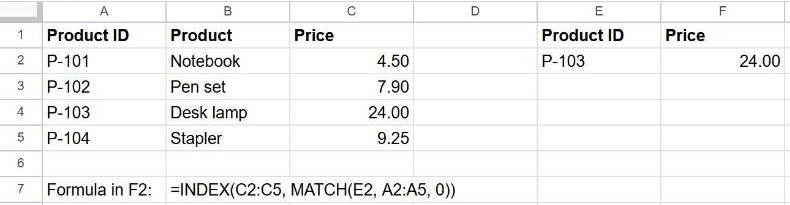
Read it inside-out: "find E2 in column A, then give me the value in the same position from column C".
Look to the left
This is where INDEX MATCH beats VLOOKUP. To find the product ID for the name "Desk lamp" (searching column B, returning column A):
=INDEX(A2:A5, MATCH("Desk lamp", B2:B5, 0))VLOOKUP can't do this, because it only returns columns to the right of the search column.
INDEX MATCH vs VLOOKUP vs XLOOKUP
| VLOOKUP | INDEX MATCH | XLOOKUP | |
|---|---|---|---|
| Look to the left | No | Yes | Yes |
| Survives inserted columns | No | Yes | Yes |
| Easy to read | Yes | Medium | Yes |
| Works in older files and Excel versions | Yes | Yes | Newer only |
If you're working only in Google Sheets, XLOOKUP is simpler. INDEX MATCH is worth knowing because it works everywhere, including old Excel files. For the basics, see our VLOOKUP guide.
Frequently asked questions
Why does it return #N/A?
MATCH didn't find the value. Check for extra spaces or numbers stored as text, and make sure you used 0 as the last argument of MATCH. Wrap the formula in IFNA(…, "Not found") to show a message instead.
Do both ranges have to be the same size?
Yes. The INDEX range and the MATCH range should start and end on the same rows, otherwise the position points to the wrong row.