How to Use the UNIQUE Function in Google Sheets
UNIQUE takes a list with repeated values and returns each value only once. It's perfect for building a list of categories, customers or products from a long table, and because it's a formula, the list updates itself as the data changes.
UNIQUE syntax
=UNIQUE(range)Type the formula in an empty cell. The results "spill" down into the cells below, so make sure there's enough empty space.
Get the unique values from a column
An expense list has the category in column A, with Food and Transport appearing several times. To list each category once:
=UNIQUE(A3:A7)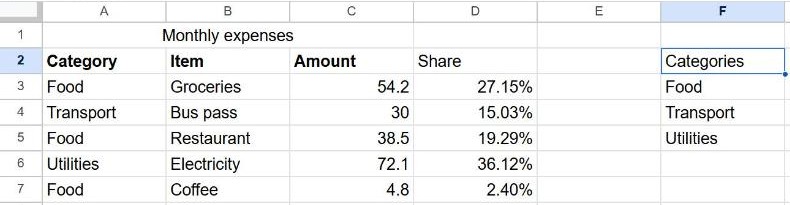
Useful variations
| Formula | What it does |
|---|---|
=UNIQUE(A2:A) | Unique values from the whole column, so new rows are included automatically |
=SORT(UNIQUE(A2:A7)) | Unique values sorted A → Z |
=UNIQUE(A2:B7) | Unique rows: a row is removed only if every column matches another row |
=COUNTUNIQUE(A3:A7) | How many different values there are (3 in the example) |
Blank cells: if the range includes empty rows, UNIQUE returns one empty result for them. Use =UNIQUE(FILTER(A2:A, A2:A<>"")) to leave blanks out.
Build a summary table with UNIQUE and SUMIF
UNIQUE is the first half of a quick summary. List the categories in column H with =UNIQUE(A3:A7), then in I2 add up each one:
=SUMIF($A$3:$A$7, H2, $C$3:$C$7)Copy it down next to each category. See our SUMIF guide for details.
UNIQUE vs. Remove duplicates
UNIQUE leaves your data untouched and creates a live list elsewhere. Data → Data cleanup → Remove duplicates deletes the duplicate rows from the data itself. Pick UNIQUE when the source keeps changing; see how to remove duplicates for the other approach.
Frequently asked questions
Why does UNIQUE show #REF!?
The results need empty cells to spill into, and something is in the way. Clear the cells below (and to the right, for multiple columns) of the formula.
Is UNIQUE case-sensitive?
Yes. "Food" and "food" are treated as different values. Use =UNIQUE(PROPER(A3:A7)) to standardize capitalization first.
Can I edit the values UNIQUE returns?
Not directly, because they're formula results. To get fixed values, copy the results and use Edit → Paste special → Values only.