How to Change the Date Format in Google Sheets
The same date can be shown as 3/25/2026, 25/03/2026, 2026-03-25 or "Wednesday, March 25, 2026". Changing the format only changes how it looks; the date underneath stays the same, so formulas keep working.
Use a built-in date format
- Select the cells with dates.
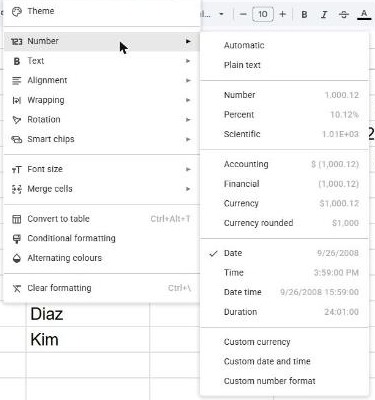
- Go to Format → Number.
- Choose Date for a short date, or Date time to include the time.
Create a custom date format
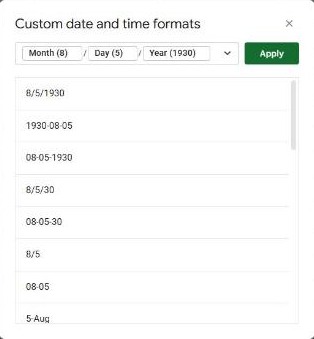
- Select the dates and go to Format → Number → Custom date and time.
- Pick one of the suggested formats, or build your own: click the parts in the box (day, month, year) and choose how each one is shown, for example the month as "Mar" or "March".
- Click Apply.
Common format codes
These codes work in custom formats and in the TEXT function:
| Code | Shows | Example |
|---|---|---|
d / dd | Day, with or without leading zero | 5 / 05 |
ddd / dddd | Short or full weekday | Wed / Wednesday |
m / mm | Month number | 3 / 03 |
mmm / mmmm | Short or full month name | Mar / March |
yy / yyyy | Year | 26 / 2026 |
Format a date inside a formula: TEXT
When you join a date with text, it turns into a number like 46106. Wrap it in TEXT to control how it appears:
="Due on "&TEXT(B2, "d mmm yyyy")This gives "Due on 25 Mar 2026". Note that TEXT returns text, so use it for display, not for calculations.
Dates showing in the wrong order (day/month)?
The default order depends on the spreadsheet's locale. Go to File → Settings and set Locale to your country, for example United States for month/day/year or United Kingdom for day/month/year. Existing dates are reformatted automatically.
Watch out: changing the locale doesn't fix dates that were typed as text. If a "date" sits on the left of the cell, Sheets doesn't recognize it. Retype it, or convert it with =DATEVALUE(A2).
Frequently asked questions
Why does my date show as a number like 46106?
The cell is formatted as a number. Apply Format → Number → Date and it displays as a date again. Dates are stored as the number of days since December 30, 1899.
How do I show only the month and year?
Use a custom format such as mmmm yyyy (March 2026), or =TEXT(A2, "mmm yyyy").