Fix "You cannot convert an alternating color range without a header format into a table"
You select some data in Google Sheets, choose Format → Convert to table (or press Ctrl+Alt+T), and instead of a table you get this message:
There was a problem. You cannot convert an alternating color range without a header format into a table. Please specify one and try again.

Why it happens
Your range already has alternating colors applied, and that alternating color style has the Header option switched off. A table always has a header row, so Google Sheets doesn't know which row should become the table's header and stops.
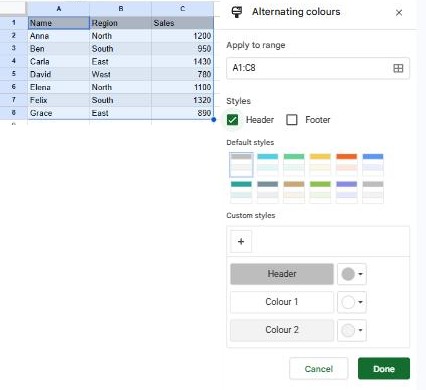
The "header format" in the message just means the Header tick box in the Alternating colors panel.
Fix 1: turn on the header (keeps your colors)
- Click any cell in the range.
- Go to Format → Alternating colors.
- In the panel, tick Header and click Done.
- Make sure the first row of the range really is your header row (column names).
- Choose Format → Convert to table again.
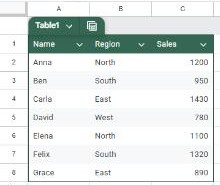
This time the conversion works:
Fix 2: remove the alternating colors first
Tables come with their own striped formatting, so you usually don't need the old alternating colors at all:
- Click any cell in the range and open Format → Alternating colors.
- Click Remove alternating colors at the bottom of the panel.
- Choose Format → Convert to table.
After converting, you can change the table's colors from the table name menu (the arrow next to Table1).
Still getting the error?
- Several alternating color ranges: a sheet can have more than one. Click a cell in each part of your data and check the panel. The Apply to range box shows which cells each style covers.
- The selection is bigger than the data: if you selected whole columns, the conversion may include another range. Select only your data, header included, and try again.
- Merged cells: tables don't accept merged cells. Unmerge them first.
Frequently asked questions
Do I lose my data when I convert to a table?
No. Converting only changes the formatting and adds the table features (column types, filters, a name). You can undo it with Ctrl+Z.
Can I have alternating colors without a table?
Yes. Alternating colors work on any range, with or without a header. You only need the header when you want to convert the range into a table.
What's the difference between a table and alternating colors?
Alternating colors are just formatting. A table is a structured range: it has a name, a frozen header, filter menus on each column and column types such as dates or drop-downs. Use alternating colors for a quick visual touch and a table when you want to manage the data. To color cells based on their values instead, use conditional formatting.