Google Sheets Keyboard Shortcuts: The 40 Most Useful
Keyboard shortcuts are the fastest way to work in Google Sheets. You don't need to learn them all: the ones below cover almost everything people do every day.
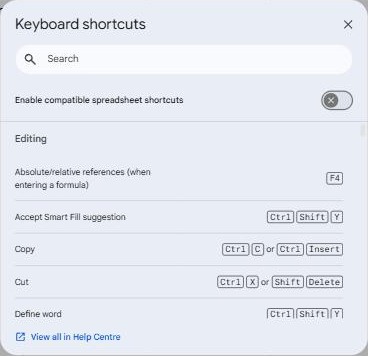
See every shortcut: Ctrl + /
Press Ctrl + / (⌘ + / on Mac) inside any spreadsheet to open the full list, with a search box.
Moving and selecting
| Action | Windows | Mac |
|---|---|---|
| Jump to the edge of the data | Ctrl + arrow | ⌘ + arrow |
| Select to the edge of the data | Ctrl + Shift + arrow | ⌘ + Shift + arrow |
| Select all | Ctrl + A | ⌘ + A |
| Select the whole row / column | Shift + Space / Ctrl + Space | Shift + Space / ⌘ + Space |
| Go to the first cell (A1) | Ctrl + Home | ⌘ + Fn + ← |
| Next / previous tab | Ctrl + Shift + PgDn / PgUp | ⌘ + Shift + Fn + ↓ / ↑ |
Editing
| Action | Windows | Mac |
|---|---|---|
| Edit the active cell | F2 | Enter |
| Fill down / fill right | Ctrl + D / Ctrl + R | ⌘ + D / ⌘ + R |
| Paste values only | Ctrl + Shift + V | ⌘ + Shift + V |
| Find / Find and replace | Ctrl + F / Ctrl + H | ⌘ + F / ⌘ + Shift + H |
| Insert today's date / time | Ctrl + ; / Ctrl + Shift + ; | ⌘ + ; / ⌘ + Shift + ; |
| Line break inside a cell | Ctrl + Enter | ⌘ + Enter |
| Insert link | Ctrl + K | ⌘ + K |
| Add a comment | Ctrl + Alt + M | ⌘ + Option + M |
Formatting
| Action | Windows | Mac |
|---|---|---|
| Bold / italic / underline | Ctrl + B / I / U | ⌘ + B / I / U |
| Strikethrough | Alt + Shift + 5 | ⌘ + Shift + X |
| Format as percent | Ctrl + Shift + 5 | ⌘ + Shift + 5 |
| Format as currency | Ctrl + Shift + 4 | ⌘ + Shift + 4 |
| Clear formatting | Ctrl + \ | ⌘ + \ |
Rows, columns and formulas
| Action | Windows | Mac |
|---|---|---|
| Hide rows / columns | Ctrl + Alt + 9 / 0 | ⌘ + Option + 9 / 0 |
| Switch between relative and absolute references | F4 | F4 |
| Show all formulas | Ctrl + ` | ⌘ + ` |
| Turn a formula into ARRAYFORMULA | Ctrl + Shift + Enter | ⌘ + Shift + Enter |
More on these in hiding rows, absolute references and ARRAYFORMULA.
Frequently asked questions
A shortcut doesn't work. Why?
Your browser or an extension may use the same keys. Some shortcuts also differ on non-US keyboards. Search the Ctrl + / list for the version on your system.
Can I use my Excel shortcuts?
Many work already. Turn on Enable compatible spreadsheet shortcuts in the Ctrl + / dialog for more.