Fix "You can't merge frozen and non-frozen rows" in Google Sheets
Frozen rows and merged cells don't mix well in Google Sheets. Depending on which one you do first, you get one of these messages:
- You can't merge frozen and non-frozen rows. (or columns)
- Sorry, you can't freeze rows which contain only part of a merged cell.
Both have the same cause, and both take a few seconds to fix.
"You can't merge frozen and non-frozen rows"
You get this when you try to merge cells that are partly in the frozen area and partly below it. For example, row 1 is frozen and you select A1:A2 and choose Format → Merge cells → Merge all:

Frozen rows stay at the top while the rest of the sheet scrolls. A merged cell can't be half fixed and half scrolling, so Sheets refuses.
Fix: make the frozen area match the merge. Either:
- Freeze more rows, so the whole merged cell is inside the frozen area: View → Freeze → 2 rows (or Up to row …). Then merge.
- Unfreeze first with View → Freeze → No rows, merge, and freeze again afterwards with enough rows.
- Merge only inside one area: for a title, merge across the columns of row 1 only (A1:D1), not down into row 2.
The same error with columns
If column A is frozen and you merge A3:B3, the message says columns instead:

The fix is the same: View → Freeze → 2 columns (so both A and B are frozen), or No columns while you merge.
"You can't freeze rows which contain only part of a merged cell"
This is the same conflict the other way round. The cells are already merged (say A1:A2), and you try to freeze only row 1:

As the message suggests, you can:
- Freeze more rows so the merged cell fits completely. Here, View → Freeze → 2 rows works straight away.
- Break apart the merged cell: select it and choose Format → Merge cells → Unmerge, then freeze 1 row.
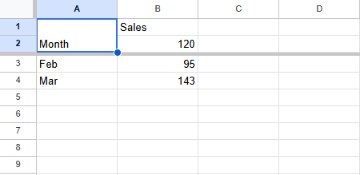
Columns work the same way: if a merged cell spans columns A and B, freeze 2 columns or unmerge it.
Frequently asked questions
How do I find which merged cell is in the way?
Look at the rows or columns next to the freeze line. Click a cell: if the cell outline covers more than one row or column, it's merged. To clear every merge at once, select the whole sheet with Ctrl+A and choose Format → Merge cells → Unmerge.
Can I have a merged title above a frozen header row?
Yes. Merge the title across columns in row 1 only, keep the column names in row 2, and freeze 2 rows. Nothing crosses the freeze line, so there's no error.
Why did a value disappear when I merged?
Merging keeps only the top-left value and deletes the others, after a warning. Combine the text first if you need it. See how to merge cells without losing data.
Do merged cells cause other problems?
Yes: vertical merges also stop you from sorting and filtering. See "You can't sort a range containing vertical merges".