How to Insert Today's Date and Time in Google Sheets (TODAY and NOW)
Google Sheets has two functions for "right now": TODAY returns the current date, and NOW returns the current date and time. Both update by themselves, which makes them perfect for countdowns, ages and "days overdue" columns.
TODAY and NOW
=TODAY()
=NOW()
Neither function takes anything inside the brackets, but the brackets are still required.
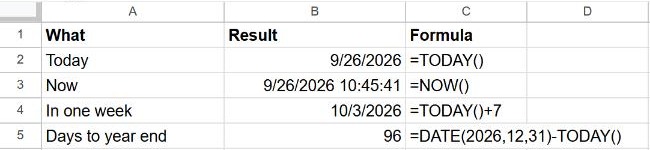
Useful date calculations
| You want… | Formula |
|---|---|
| A date one week from today | =TODAY()+7 |
| Days until a deadline in B2 | =B2-TODAY() |
| Days overdue (0 if not yet due) | =MAX(0, TODAY()-B2) |
| Age in years from a birth date in B2 | =DATEDIF(B2, TODAY(), "Y") |
| The first day of the current month | =EOMONTH(TODAY(), -1)+1 |
If a result shows as a date when you expected a number of days, change it with Format → Number → Number. More in how to calculate days between dates.
Insert a date that doesn't change
TODAY and NOW always show the current moment, so yesterday's entries change too. To record when something happened, type a fixed value instead with a shortcut:
| Insert | Windows | Mac |
|---|---|---|
| Today's date | Ctrl + ; | ⌘ + ; |
| Current time | Ctrl + Shift + ; | ⌘ + Shift + ; |
You can also copy a TODAY() cell and use Edit → Paste special → Values only to freeze it.
How often do they update?
TODAY and NOW recalculate whenever the sheet changes. To also refresh them on a timer, go to File → Settings → Calculation and set Recalculation to On change and every minute or every hour.
Frequently asked questions
Why does NOW show the wrong time?
The time comes from the spreadsheet's time zone, not your computer's. Check it under File → Settings → Time zone.
How do I show only the time from NOW?
Select the cell and choose Format → Number → Time. See how to change the date format for other styles.