How to Combine Text from Cells in Google Sheets (CONCATENATE and TEXTJOIN)
Combining text (also called concatenating) joins the contents of several cells into one. It's how you turn a first-name column and a last-name column into a full name, or build an address from separate parts. Google Sheets gives you three ways to do it.
The & operator (simplest)
The ampersand & glues text together. With a first name in A2 and a last name in B2:
=A2&" "&B2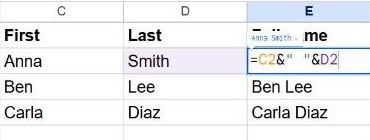
" " in the middle adds a space between the two names.Everything in double quotes is added literally, so you can join more parts: =A2&" "&B2&" ("&C2&")" gives "Anna Smith (Boston)".
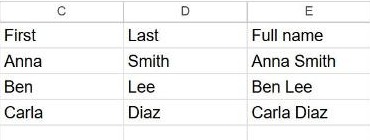
CONCATENATE
CONCATENATE does the same thing as a function. It's handy when you prefer named functions:
=CONCATENATE(A2, " ", B2)It doesn't add separators for you, so include the spaces yourself, just like with &.
TEXTJOIN (best for many cells)
TEXTJOIN adds a separator between every piece automatically and can skip empty cells, which makes it ideal for joining a whole row or list:
=TEXTJOIN(", ", TRUE, A2:C2)- First argument – the separator to put between items, here
", ". - Second argument –
TRUEto ignore empty cells,FALSEto keep them (which would leave double separators). - Third argument – the range or cells to join.
Example: joining tags in A2:E2 where some cells are empty, =TEXTJOIN(", ", TRUE, A2:E2) gives a clean comma-separated list with no gaps.
Add a line break between parts
Use CHAR(10) as the separator to stack the parts on separate lines inside one cell:
=TEXTJOIN(CHAR(10), TRUE, A2:C2)Turn on Format → Wrapping → Wrap so the line breaks show. See how to wrap text.
Frequently asked questions
How do I keep leading zeros or a specific date format?
Numbers lose their formatting when joined. Wrap them in TEXT first, for example =A2&" - "&TEXT(B2, "dd/mm/yyyy").
How do I split text back into columns?
Use Split text to columns or the SPLIT function. See how to split text into columns.
Why is there no space between my words?
You need to add it yourself: =A2&B2 gives "AnnaSmith", while =A2&" "&B2 gives "Anna Smith".