Fix "Sorry, it is not possible to delete all non-frozen rows" in Google Sheets
You want to start a sheet over, so you select every row below your frozen header and choose Delete rows. Google Sheets stops you with:

Why it happens
A sheet with frozen rows must always keep at least one normal, scrolling row below them. If your selection covers every row below the freeze line, deleting it would leave nothing but the frozen part, so Sheets refuses.
Fix 1: keep one row
Delete everything except the first row below the freeze line:
- Click the Name box (left of the formula bar), type the rows to delete, for example
4:1000, and press Enter. That selects rows 4 to 1000 and leaves row 3. - Right-click a selected row number and choose Delete rows 4 - 1000.
- Click row 3 and press Delete to empty it.
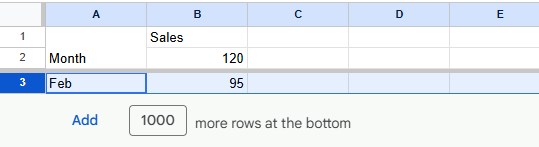
When you need more rows later, scroll to the bottom and click Add next to 1000 more rows at the bottom. See how to insert multiple rows.
Fix 2: clear the rows instead of deleting them
If you only want the sheet empty, you don't need to delete rows at all. Select the rows below the header and press Delete. The contents disappear, the rows stay, and there's no error. To also remove colors and borders, use Format → Clear formatting.
This is usually the better choice for templates: formulas elsewhere that point at those rows keep working.
Fix 3: unfreeze first
If the frozen rows are part of what you want to delete, remove the freeze first with View → Freeze → No rows, then delete the rows you don't need, and freeze again if you still want a header.
Frequently asked questions
What's the difference between deleting and clearing rows?
Deleting removes the rows: everything below moves up. Clearing (the Delete key) empties the cells but keeps the rows where they are.
How do I delete only the empty rows?
See how to remove blank rows: sort or filter them together and delete them in one go.
Can I hide the rows instead?
Yes. Select them, right-click and choose Hide rows. Hidden rows are kept and can be shown again. See how to hide rows.