Pivot Table Editor Not Showing in Google Sheets? Here's the Edit Button
You made a pivot table, closed the panel on the right, and now clicking the table doesn't bring the Pivot table editor back. That's normal: once you close it, Google Sheets shows a small Edit button instead. We tested where it appears and what opens the editor again.
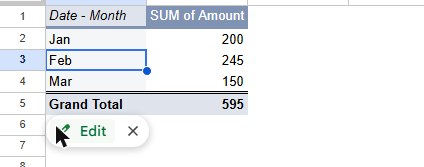
Open the editor again
- Click any cell inside the pivot table.
- Look just below its bottom-left corner: a small Edit button with a pencil appears.
- Click Edit. The Pivot table editor opens again on the right, with your rows, columns and values as you left them.
In our test, clicking cells inside the table after closing the editor did not reopen it on its own; only the Edit button did. Clicking a cell outside the table while the editor was open didn't close it either: it stays until you click the X at its top-right.
Still no Edit button?
- You clicked outside the pivot table. The button only appears when the selected cell is part of the table. Click a value or a row label.
- You're on the wrong tab. Pivot tables usually live on their own tab (for example Pivot Table 1), not next to your data.
- That tab is hidden. If you can't find the pivot tab at all, it may be hidden: see sheet tabs not showing.
- It isn't a pivot table. If the table was copied and pasted as values, or comes from a QUERY formula, there's no editor to open. A pivot table's header cells are shaded and its first header shows the field name, like Date - Month.
- You can only view the file. Editing a pivot table changes the sheet, so you need edit access.
Frequently asked questions
How do I group dates by month in the pivot table?
Newer versions of Sheets add ready-made fields like Date - Month to the editor. Step by step in how to make a pivot table.
The pivot table doesn't show my new rows. Why?
Check the range at the top of the editor (for example Sheet1!G1:H7). New rows below it aren't included. Change it to cover more rows, like Sheet1!G1:H1000.