How to Use the QUERY Function in Google Sheets
QUERY is the most powerful function in Google Sheets. With one formula you can pick columns, keep only matching rows, sort them and even total them by group. It uses a simple language that reads almost like English.
QUERY syntax
=QUERY(data, query, [headers])- data – the range to work on, for example
A1:C7. - query – the instructions, in double quotes. Columns are referred to by their letter: A, B, C…
- headers – optional. How many header rows the data has, usually
1.
Example: only the rows you want
An expense list has Category in column A, Item in B and Amount in C. To show only the Food purchases:
=QUERY(A1:C7, "SELECT A, B, C WHERE A = 'Food'", 1)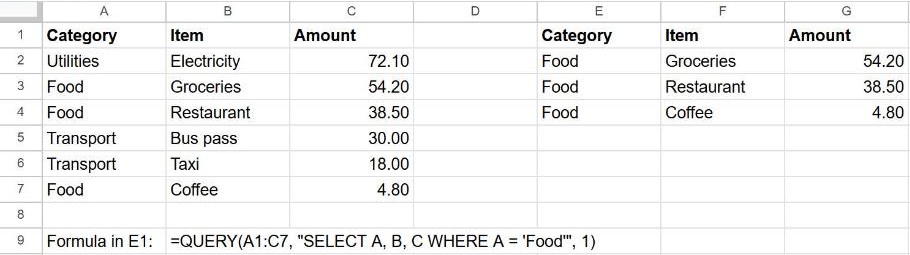
Quotes matter: the whole query goes in double quotes, and text values inside it go in single quotes: 'Food'.
The main clauses
| Clause | What it does | Example |
|---|---|---|
SELECT | Which columns to show | SELECT A, C or SELECT * |
WHERE | Keep only matching rows | WHERE C > 20 |
ORDER BY | Sort the result | ORDER BY C DESC |
GROUP BY | Combine rows into groups | GROUP BY A |
LIMIT | Show only the first N rows | LIMIT 3 |
Clauses must appear in this order: SELECT, WHERE, GROUP BY, ORDER BY, LIMIT.
Useful examples
| You want… | Query |
|---|---|
| The 3 biggest expenses | "SELECT B, C ORDER BY C DESC LIMIT 3" |
| Expenses over 20 | "SELECT * WHERE C > 20" |
| Total per category | "SELECT A, SUM(C) GROUP BY A" |
| Items containing "pass" | "SELECT * WHERE B CONTAINS 'pass'" |
| Everything except Food | "SELECT * WHERE A <> 'Food'" |
Use a cell value in the query
To filter by whatever category is typed in F1, join it into the query text:
=QUERY(A1:C7, "SELECT * WHERE A = '"&F1&"'", 1)Change F1 and the result updates.
Frequently asked questions
Why do I get "Unable to parse query string"?
Usually a quoting or order problem. Check that text values use single quotes, column letters are uppercase, and the clauses follow the order SELECT → WHERE → GROUP BY → ORDER BY → LIMIT.
Why are some values missing from the result?
QUERY expects one data type per column. If a column mixes numbers and text, the minority type is treated as empty. Keep each column consistent.
QUERY or FILTER?
For a simple "show rows where…", FILTER is shorter. Use QUERY when you also need to sort, group or total in the same step.