How to Round Numbers in Google Sheets (ROUND, ROUNDUP, ROUNDDOWN)
There are two ways to "round" in Google Sheets. You can change how many decimals are shown, which leaves the real value untouched, or you can change the value itself with a function. Which one you need depends on whether later calculations should use the rounded number.
Just change the display
Select the cells and use the Decrease decimal places and Increase decimal places buttons on the toolbar (the ones labelled .0← and .00→). A value of 12.3456 can look like 12.35, but formulas still use 12.3456.
Round the actual value
| Function | What it does | 12.345 becomes |
|---|---|---|
=ROUND(A2, 2) | Normal rounding (5 and up goes up) | 12.35 |
=ROUNDUP(A2, 2) | Always rounds away from zero | 12.35 |
=ROUNDDOWN(A2, 2) | Always rounds toward zero (cuts off) | 12.34 |
=ROUND(A2) | To a whole number | 12 |
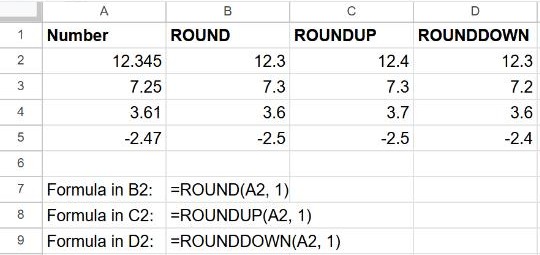
The second argument is the number of decimal places. Leave it out (or use 0) to round to a whole number.
Round to tens, hundreds or thousands
Use a negative number of places:
=ROUND(1234, -1)   → 1230
=ROUND(1234, -2)   → 1200
=ROUND(1234, -3)   → 1000
Round to the nearest 0.05, 5 or 15
MROUND rounds to the nearest multiple of any number:
=MROUND(A2, 0.05)   prices to the nearest 5 cents
=MROUND(A2, 5)      to the nearest 5
=MROUND(A2, 15)     minutes to the nearest quarter hour
To always round up or down to a multiple, use CEILING(A2, 5) or FLOOR(A2, 5).
Frequently asked questions
Why does my total not match the rounded numbers?
If you only changed the display, the total adds the full values. Round the values with ROUND first, or round the total itself: =ROUND(SUM(B2:B10), 2).
How do I remove decimals without rounding?
Use =TRUNC(A2) or =ROUNDDOWN(A2). Both cut off the decimals; INT does the same for positive numbers but rounds negatives down (−2.7 becomes −3).
Can I round a percentage?
Yes. A percentage is stored as a decimal, so 12.345% is 0.12345. To show 12.35%, round to 4 places: =ROUND(A2, 4). More in how to calculate percentages.