How to Use SUMIFS and COUNTIFS in Google Sheets (Multiple Criteria)
SUMIF and COUNTIF handle one condition. When you need two or more, for example "Food expenses paid by card" or "orders over 50 in March", use their plural versions: SUMIFS and COUNTIFS.
The syntax
=SUMIFS(sum_range, criteria_range1, criterion1, criteria_range2, criterion2, …)
=COUNTIFS(criteria_range1, criterion1, criteria_range2, criterion2, …)
Note the order: in SUMIFS the range to add comes first, unlike SUMIF where it comes last. All ranges must be the same size.
Example: expenses by category and payment method
The table lists expenses with a Category (column A), a payment Method (column B) and an Amount (column C). To add up Food expenses paid by card:
=SUMIFS(C2:C9, A2:A9, "Food", B2:B9, "Card")And to count how many there were:
=COUNTIFS(A2:A9, "Food", B2:B9, "Card")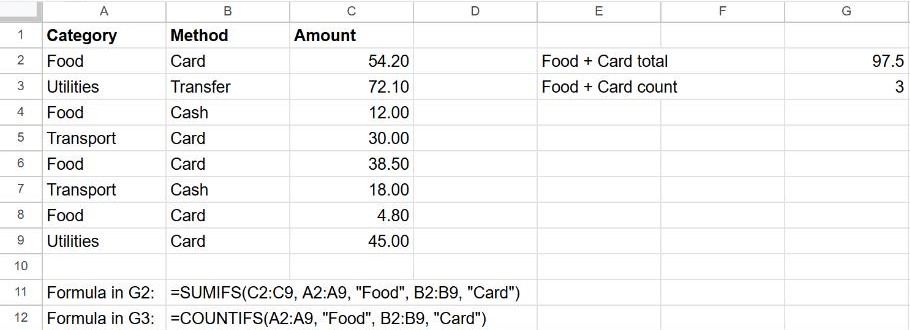
Criteria you can use
| You want… | Criterion |
|---|---|
| Exactly equal to a text | "Food" |
| Not equal to | "<>Food" |
| Greater than a number | ">50" |
| Greater than a value in a cell | ">"&F1 |
| Contains a word | "*coffee*" |
| Not empty | "<>" |
| Use the value in another cell | F2 (no quotes) |
Between two dates
Use the same date column twice, once for the start and once for the end. With dates in column D and the start and end dates in F1 and F2:
=SUMIFS(C2:C9, D2:D9, ">="&F1, D2:D9, "<="&F2)"Or" conditions
All conditions in SUMIFS must be true at the same time ("and"). For "Food or Transport", add two SUMIFS together:
=SUMIFS(C2:C9, A2:A9, "Food") + SUMIFS(C2:C9, A2:A9, "Transport")Frequently asked questions
Why does SUMIFS return 0?
Usually a spelling or spacing difference ("Food " with a space), numbers stored as text in the sum range, or ranges of different sizes. Check with a COUNTIFS using the same criteria: if it also returns 0, no row matches.
Is SUMIFS case-sensitive?
No. "food" and "Food" match the same rows.
What about a single condition?
SUMIFS works fine with one condition, but see SUMIF and COUNTIF for the simpler versions.