How to Sum a Column in Google Sheets
Adding up a column is the first thing most people do in a spreadsheet. Google Sheets gives you a formula, a toolbar button and an instant total that needs no formula at all.
The SUM formula
Click the cell below your numbers and type:
=SUM(C2:C7)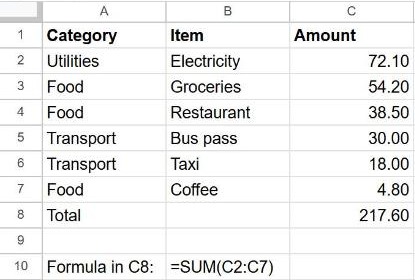
Instead of typing the range, you can type =SUM(, drag over the cells with the mouse, and press Enter.
Use the Functions button
- Select the numbers you want to add.
- Click the Functions button (Σ) on the toolbar.
- Choose SUM. Sheets writes the formula for you, and you press Enter to confirm.
See the total without a formula
Select a range of numbers and look at the bottom-right corner of the window. Sheets shows the Sum of the selection. Click it to switch to Average, Count, Min or Max. It's perfect for a quick check you don't need to keep.
Sum a whole column that keeps growing
=SUM(C2:C)Leaving off the last row number includes everything from C2 down, so new rows are added automatically. Put this formula in a different column (or above the data) so it doesn't include itself.
More ways to sum
| You want to… | Formula |
|---|---|
| Add two separate ranges | =SUM(C2:C7, E2:E7) |
| Add only rows that match a condition | =SUMIF(A2:A7, "Food", C2:C7) |
| Add only visible rows (after filtering) | =SUBTOTAL(109, C2:C7) |
| Add a column on another sheet | =SUM(Expenses!C2:C) |
For totals by category, see how to use SUMIF.
Frequently asked questions
Why does SUM return 0?
The numbers are probably stored as text (they sit on the left of the cell). Select them and choose Format → Number → Number. If that doesn't help, retype one value to check.
Why do I get a circular dependency error?
The formula is inside the range it's adding, for example =SUM(C2:C) typed in C10. Move the formula to another column or limit the range.
How do I sum a row instead?
Same function, horizontal range: =SUM(B2:F2).