Free Habit Tracker Template for Google Sheets (Weekly)
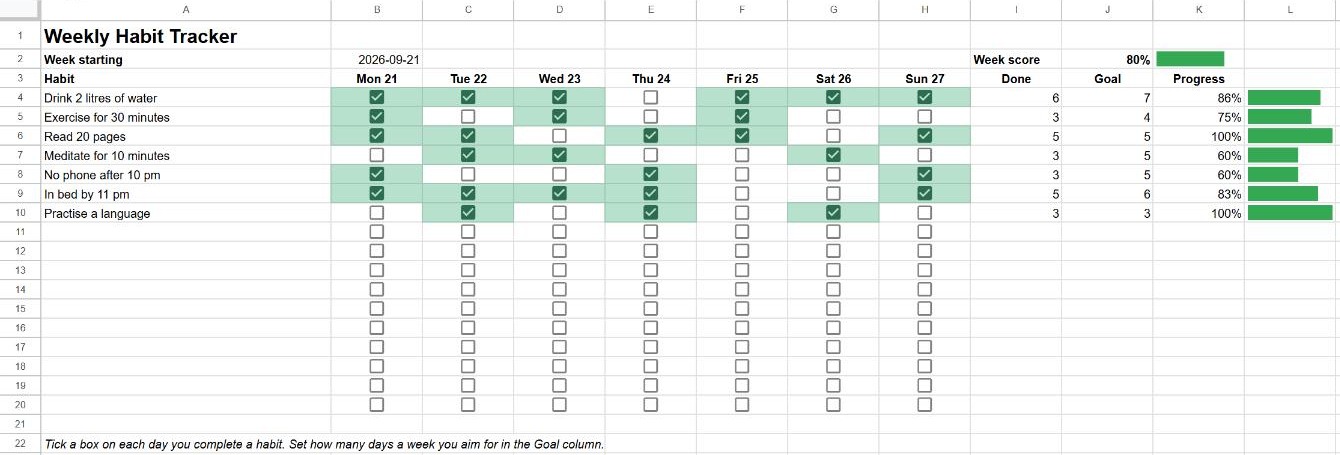
Build better habits one tick at a time. This free weekly habit tracker counts the days you complete each habit, compares them with your goal, and draws a progress bar for every habit and for the whole week.
The copy is saved to your own Google Drive, so it's private. You need to be signed in to a Google account.
What's included
- Room for 17 habits, each with a tick box for every day of the week.
- Dates in the headers: type the first day of the week once and the seven column headers update.
- Done and Goal: how many days you did each habit and how many you aimed for.
- Progress bar per habit, capped at 100%.
- Week score: all ticks divided by all goals, with its own bar.
How to use it
- Make a copy with the button above.
- Type the Monday of the current week in B2.
- Replace the example habits in column A with your own and set a weekly goal in column J (for example 3 for "three times a week").
- Tick a box each day you complete a habit.
For a new week, duplicate the tab (right-click the tab at the bottom → Duplicate), change the date in B2 and untick the boxes: select B4:H20 and press Delete, which clears the ticks but keeps the tick boxes.
The formulas inside
| Cell | Formula | What it does |
|---|---|---|
| Day header (C3) | =TEXT($B$2+1, "ddd d") | Adds days to the start date and shows it as "Tue 22". See date formats. |
| Done | =IF(A4="", "", COUNTIF(B4:H4, TRUE)) | Counts the ticked boxes in the row. See checkboxes and COUNTIF. |
| Progress | =IF(N(J4)=0, "", MIN(1, I4/J4)) | Done divided by goal, never above 100%. N() treats an empty goal as 0. |
| Progress bar | =IF(K4="", "", SPARKLINE(K4, {"charttype", "bar"; "max", 1; "color1", "#34a853"})) | Draws a bar in the cell. See SPARKLINE. |
| Week score | =IF(SUM(J4:J20)=0, 0, MIN(1, SUM(I4:I20)/SUM(J4:J20))) | All ticks divided by all goals. |
The green cells come from a conditional formatting rule on B4:H20 with the custom formula =B4=TRUE.
Customise it
- Change the colour: open Format → Conditional formatting, click the rule and pick another fill colour. For the bars, change
#34a853in the SPARKLINE formulas. - More habits: there are 17 rows ready. To add more, insert rows above row 20 and copy the formulas in I:L from the row above.
- Track a whole month: keep one tab per week, or add a summary tab that adds up the Done column from each week.
Frequently asked questions
Can I use it on my phone?
Yes. Open your copy in the Google Sheets app and tap the tick boxes. It's the easiest way to keep the tracker up to date every day.
Why is the Progress cell empty?
The habit has no goal yet. Type a number from 1 to 7 in the Goal column and the percentage and bar appear.
Can I start the week on Sunday?
Yes. Type a Sunday date in B2; the headers follow whatever date you enter.