Free Savings Goals Tracker Template for Google Sheets
Saving for a holiday, a laptop and an emergency fund at the same time? This free template keeps all your goals in one place and tells you exactly how much to put aside each month to reach each one on time.
The copy is saved to your own Google Drive, so your numbers stay private. You need to be signed in to a Google account.
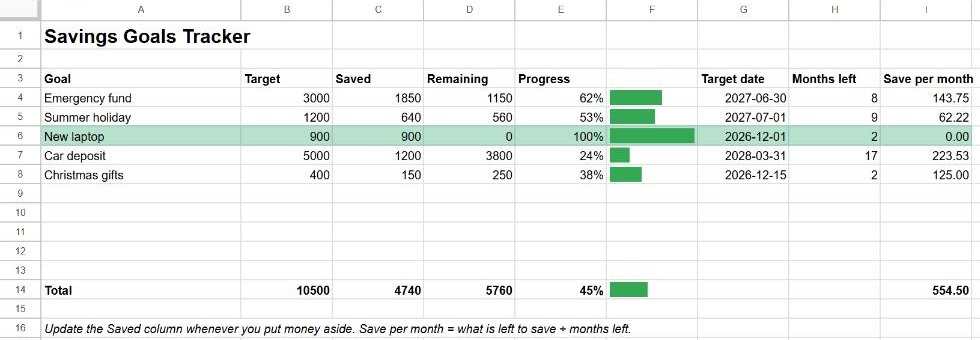
What's included
- Up to nine goals, each with a target amount, the amount saved and a target date.
- Remaining amount and progress as a percentage and a bar.
- Months left until the target date, counted from today.
- Save per month: how much you need to put aside each month to get there.
- Totals for all goals, including the total to save each month.
How to use it
- Make a copy with the button above.
- Replace the example goals with your own: a name, a target and a target date.
- Whenever you put money aside, update the Saved column.
The months left and the monthly amount update by themselves every day, because they're based on today's date.
The formulas inside
| Cell | Formula | What it does |
|---|---|---|
| Remaining | =IF(A4="", "", MAX(0, B4-C4)) | Target minus saved, never below zero. |
| Progress | =IF(OR(A4="", N(B4)=0), "", MIN(1, C4/B4)) | Saved as a share of the target, capped at 100%. See percentages. |
| Progress bar | =IF(E4="", "", SPARKLINE(E4, {"charttype", "bar"; "max", 1; "color1", "#34a853"})) | A bar inside the cell. See SPARKLINE. |
| Months left | =IF(G4="", "", IF(G4<=TODAY(), 0, DATEDIF(TODAY(), G4, "M"))) | Whole months from today to the target date. See DATEDIF and TODAY. |
| Save per month | =IF(OR(A4="", G4=""), "", IF(D4=0, 0, IF(H4<1, D4, D4/H4))) | Remaining divided by months left. With less than a month to go, it shows the whole remaining amount. |
Fully funded goals are highlighted by a conditional formatting rule on A4:I12 with the custom formula =$E4=1.
Customise it
- Show your currency: select columns B, C, D and I and choose Format → Number → Currency.
- More goals: right-click row 12 and insert rows above it, then copy the formulas from the row above. The totals include the new rows because they sit inside the SUM range.
- Keep a deposit log: add a second tab with date, goal and amount, and replace the Saved column with
=SUMIF(Log!B:B, A4, Log!C:C). See SUMIF.
Frequently asked questions
Why does "Months left" show 0?
The target date is today, in the past, or less than a full month away. In that case Save per month shows the whole remaining amount.
Can I use it in Excel?
Yes. In your copy, go to File → Download → Microsoft Excel (.xlsx). SPARKLINE is a Google Sheets function, so the progress bars won't appear in Excel, but every other formula works.