Free Expense Tracker Template for Google Sheets
Log your expenses one per row and let the sheet do the maths. This free template totals your spending by category, shows each category's share, and keeps a running total for the current month.
The copy goes to your own Google Drive, so only you can see it. You need to be signed in to a Google account.
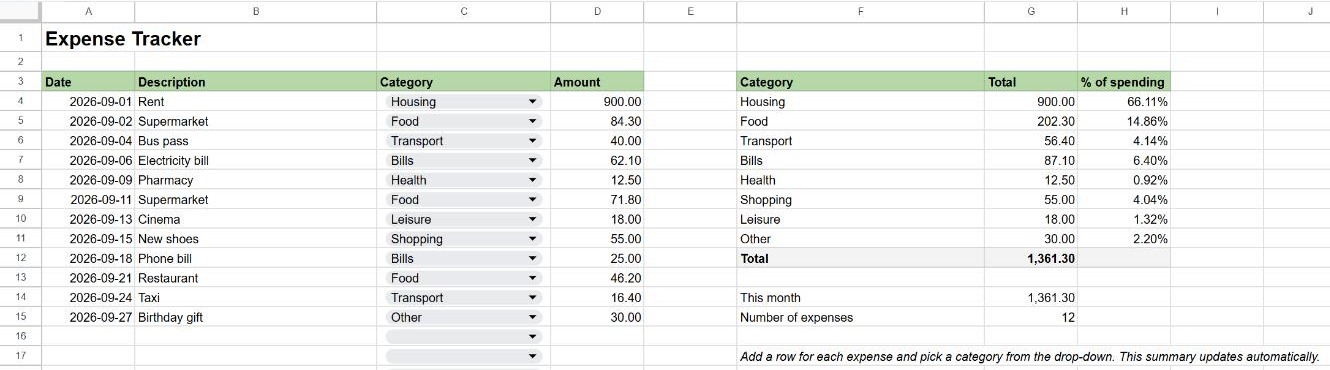
What's included
- Expense log: date, description, category and amount.
- Category drop-down: pick from Housing, Food, Transport, Bills, Health, Shopping, Leisure or Other, so every expense is spelled the same way.
- Summary by category: total and percentage of all spending.
- This month: spending in the current calendar month, based on today's date.
- Number of expenses recorded.
How to use it
- Make a copy with the button above.
- Clear the example expenses (select A4:D15 and press Delete) or simply type over them. Don't delete whole rows, or you'll remove part of the summary too.
- Add one row per expense and choose its category from the drop-down.
The summary reads the whole column, so new rows at the bottom are included automatically.
The formulas inside
| Cell | Formula | What it does |
|---|---|---|
| Total per category | =SUMIF($C$4:$C, F4, $D$4:$D) | Adds the amounts whose category matches. See SUMIF. |
| % of spending | =IF($G$12=0, 0, G4/$G$12) | Each category's share of the total. See percentages. |
| This month | =SUMIFS(D4:D, A4:A, ">="&(EOMONTH(TODAY(), -1)+1), A4:A, "<="&EOMONTH(TODAY(), 0)) | Adds expenses dated from the 1st to the last day of the current month. See SUMIFS. |
| Number of expenses | =COUNT(D4:D) | Counts the amounts entered. |
The category list uses a drop-down from a range: it reads the category names in F4:F11.
Customise it
- Change the categories: edit the names in F4:F11. The drop-down updates automatically.
- Add a category: insert a row inside the summary list and copy the formulas from the row above.
- Totals by month: build a pivot table from the log with the month in Rows and categories in Columns.
Frequently asked questions
Why does "This month" show 0?
It only counts expenses dated in the current month. The example rows are from September 2026; add expenses with today's date and they'll appear.
My dates aren't counted. Why?
They may be stored as text. Check that they align to the right of the cell; if not, see how to change the date format.