How to Fix the #N/A Error in Google Sheets (VLOOKUP, MATCH, XLOOKUP)
#N/A means "not available": a lookup function searched for a value and didn't find it. You'll see it with VLOOKUP, HLOOKUP, MATCH, XLOOKUP and INDEX/MATCH. Sometimes the value really isn't there; often it is, but something small stops Sheets from recognizing it.
What the error looks like
The formula in F2 is =VLOOKUP(E2, A2:C5, 3, FALSE). It looks for product P-105, which isn't in the list:

The five usual causes
| Cause | How to check / fix |
|---|---|
| The value really isn't in the list | Search the column with Ctrl + F. If it's missing, the error is correct: handle it with IFNA (below). |
| Extra spaces, e.g. "P-103 " | Clean the data with Data → Data cleanup → Trim whitespace, or use TRIM(E2) as the search key. |
| Number vs text: 101 and "101" don't match | Numbers sit on the right of the cell, text on the left. Make both sides the same type, e.g. VLOOKUP(TO_TEXT(E2), …) or VLOOKUP(VALUE(E2), …). |
| The search column isn't the first column of the range | VLOOKUP only searches the first column. Start the range at the ID column, or switch to INDEX and MATCH. |
| Last argument missing or TRUE on unsorted data | Always use FALSE (exact match) unless you're deliberately doing a sorted, approximate lookup. |
Show a friendly message with IFNA
When "not found" is a normal result, replace the error with your own text:
=IFNA(VLOOKUP(E2, A2:C5, 3, FALSE), "Not found")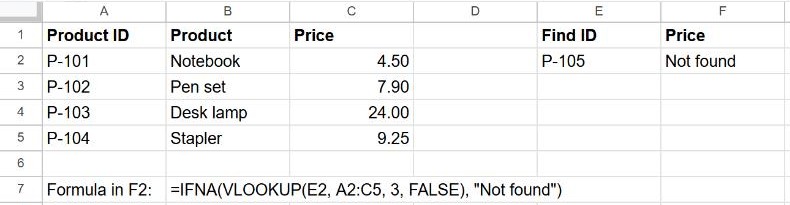
Prefer IFNA over IFERROR for lookups. IFERROR would also hide a #REF! from a broken range, or a #NAME? from a typo, and you'd never know the formula was wrong.
XLOOKUP has this built in
XLOOKUP takes a "missing value" argument, so you don't need IFNA:
=XLOOKUP(E2, A2:A5, C2:C5, "Not found")Frequently asked questions
The value is clearly there. Why #N/A?
Nine times out of ten it's a trailing space or a number stored as text. Test with =A4=E2: if it returns FALSE when both look identical, the values aren't really the same.
How do I count how many lookups failed?
=SUMPRODUCT(--ISNA(F2:F100)) counts the #N/A cells in a column.