How to Fix the #VALUE! Error in Google Sheets
#VALUE! means a formula received the wrong type of data: usually text where it expected a number. Sheets tells you exactly which value caused the problem, so this error is quick to fix once you read the message.
What the error looks like
Column D multiplies price by quantity with =B3*C3. Someone typed the quantity as the word "two":
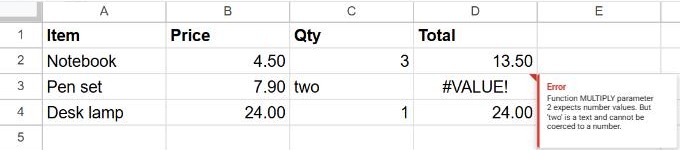
Sheets can convert text that looks like a number, such as "2", on its own. It can't convert a word, a stray space or a symbol.
Common causes and fixes
| Cause | Fix |
|---|---|
| A word or note in a number column ("two", "n/a", "TBC") | Replace it with a number, or leave the cell empty. |
| A cell that looks empty but contains a space | Select the cell and press Delete, or run Data → Data cleanup → Trim whitespace. |
| Numbers with units typed in, like "5 kg" or "€12" | Keep only the number in the cell and add the unit with Format → Number → Custom number format. |
| A date typed as text that Sheets doesn't recognize | Retype it in your locale's order, or convert it with DATEVALUE. See how to change the date format. |
Make formulas more tolerant
Use SUM instead of +. =B2+C2+D2 fails if any cell is text, but =SUM(B2:D2) simply skips text. The same goes for PRODUCT versus *.
Convert text numbers with VALUE. If numbers were imported as text, =VALUE(C3) turns "3" into 3.
Hide the error when blanks are expected:
=IFERROR(B3*C3, "")Use IFERROR sparingly: it also hides errors you'd want to see.
Frequently asked questions
How do I find which cell is text?
Text sits on the left of the cell by default, numbers on the right. You can also test a cell with =ISNUMBER(C3).
Is #VALUE! the same as #N/A?
No. #VALUE! is about the wrong data type; #N/A means a lookup didn't find anything.
Why does my SUM return 0 instead of #VALUE!?
Because SUM ignores text. If every "number" is stored as text, the total is 0. See how to sum a column.